Saturday, November 19, 2011

Whidbey Island, Photo Forge

Whidbey Island Lighthouse
This is a slightly different version of the Photo Forge workflow talked about on the Pixel-Show page yesterday. The basics are still the same in Photo Forge but the after treatment and sharpening are slightly different...I have worked up the basic treatment below - this was done on the old photo forge - I find that dialog a bit easier to get around and the results, at least for me, are better:

1, Once your image is loaded hit the funnel (yes the funnel) which will expose the Unsharp Mask icon.
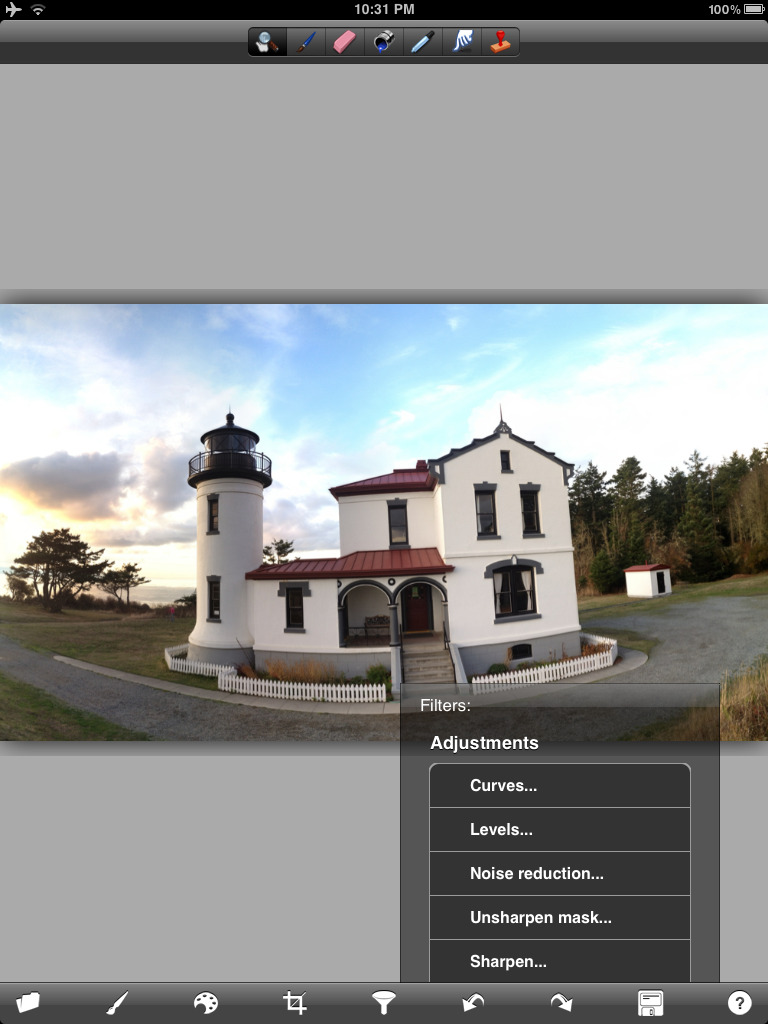
2. Tap the unsharp mask icon to reveal the USM dialog:
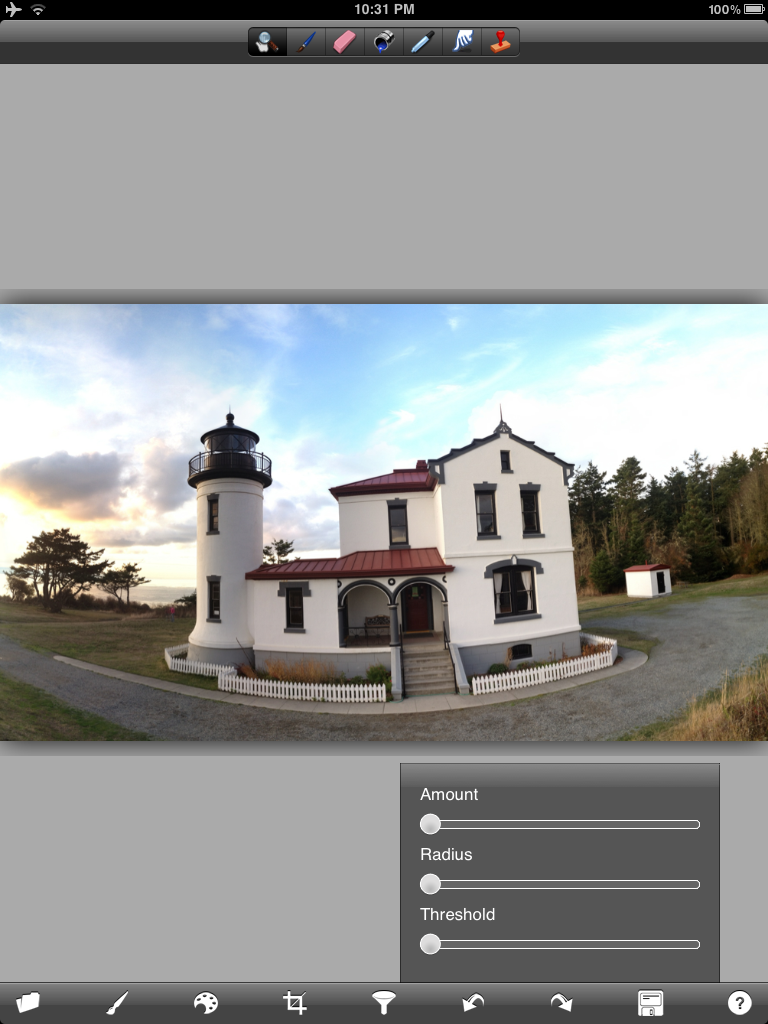
3. There are several ways to use this USM. You can run the amount all the way up and then use the radius to your liking or you can do the reverse - radius up and amount down. They will effect the image in different ways - this is actually a sharpening method that comes from using phototshop and you should navigate your own way to what you might like. Lately I have changed to using the set-up below. When this was first introduced there were very few choices as to how to get this look - now there are several new apps that do a better job - but start here and play a bit.

4. The alternative way using forge is to just use the sharpen slider - USM if not done correctly will add artifacts into the image and depending on the image sharpen works just as well. I usualy start with the strength below.....


5. Once sharpened navigate (scroll down) and find the oil painting and watercolor sliders. You can use one or both - yo can use one - resharpen and then use the other - it is all trail and error depending on the look you are after.  As Teri Lou says PLAY PLAY PLAY


6. At 100% opacity the image will look something like this:


7. Adjust the slider to your taste.....

8. A combo of both watercolor and oil paint.....


9. Combo with adjusted opacity....


10. My starting point for the image above.....


At this point it is completely up to your creativity as to what happens next. I always like to have some clarity in the image so the subject stands out....I use Dynamic Light, Filterstorm, Snapseed and Blender to work up the final look. I even used Iris on the image posted today....
Take a Last-Pixel Show Workshop and learn more creative choices for your iPhone imagery - not to mention printing techniques and much more....If you can't make a workshop then take one of Teri Lou's online courses - they are perfect for learning basics and much more....


Friday, November 18, 2011

The Last-Pixel Show, Printing iPhone Photography Images

The last day of a Last-Pixel Show workshop is usually spent preparing the student images for print and then actually printing. This involves scaling, retouching artifacts and finally print sharpening. The images are printed using on Epson Ultra Smooth Fine Art (matte) or Museo Silver Rag papers (lustre) - they are printed on Epson pitners using the Photoshop and/or Lightroom dialog.

Take a Last-Pixel Show workshop and learn how to maintain the quality and resolution of your images during processing to ensure the highest quality print possible.

Here are a few of the image from the Whidbey Island Workshop (in alphabetical order):
Kathleen Brennan
Cecily Batey Caceu
Marcia Duff

Bruce Metcalf


Wednesday, November 16, 2011

Caddo Lake - Sunrise

Today's image is a re-doux of an image made last April at Caddo Lake. I try and make at least one trip per year to this location - Uncertain, Texas. Quite the mysterious location......when one is out on the boat it feels timeless and very eerie....

Tuesday, November 15, 2011

Coney Island Pier

Coney Island, Pier
I have processed this image several times and even posted it once but was never satisfied with the final outcome - was looking for a bit more ambient color to give the effect of waves rolling over the rocks. This morning it was Snapseed Structure that finally made it work for me. That and oversaturating in Filterstorm then brushing in the result locally.

Learn something new, go back and re-process - you never know what will happen.

The original image was made with ProHDR, Filterstorm, Dynamic Light, Rays and Photoforge.

Monday, November 14, 2011

Suzy Hotrod, Roller Derby and the iPad

Suzy Hotrod - Gotham Girls - New York
Last night while downloading images I  thought why not process one of my Canon 5DMKII derby images on the iPad. I did the same thing with my old music images and liked the effect. So I took this image of Suzy Hotrod (yup - one event and already name dropping derby folks) and transferred it over to the iPad.

The only application I used was 'Metal Me HD' - not sure how I found this one but thought it might must work for this type of image - Note this is a low res application but I managed to keep it at 3.5MP at the end with various blending techniques...My feeling is that this application is worth a look...

PS: I blended Suzy back in using Filterstorm...

The Last-Pixel Show will be teaching this technique in the upcoming workshop in Carmel, Indiana.... click here for more information.


Sunday, November 13, 2011

Grain

Original ProHDR Image
The much anticipated upgrade to ProHDR was released a few days ago and thus far I am impressed with the changes they made. ProHDR is much faster and the new dialog is much easier to navigate then the last version.

What I first noticed was the addition of filter choices - seems like every application is starting to offer this feature. I just happened to be in the second oldest city in Denver, Georgetown, and decided to try the vintage filter while shooting the Georgetown Museum. 

In addition to the color Pro added some grain - seemingly to enhance the vintage look and feel. Honestly, I never noticed the grain addition (using the iphone not the ipad) until it was mentioned on a facebook page I participate in. After getting a closer look on the iPad I found the grain to not be to my liking and decided to run a few test on other applications that had 'grain' as a processing choice. Admittedly I did not try all the options, instead opting for my own application preferences.

MONOPHIX:
MonoPhix Version

 MonoPhix Dialog where you would pick FAST FILM...

MonoPhix Noise Grain Generator for amount of grain


SIMPLY BLACK AND WHITE:  Dialog for grain....


PHOTO WIZARD: After importing your image choose the FX icon at the top of the screen. On the right you will find both the 'GRAY PRESETS' (for Silver) and the 'ADD NOISE' ' icon for the grain.


Photo Wizard - Choose Silver under the ''GRAY PRESET' Icon

Photo Wizard - Adjust the grain/noise under the 'ADD NOISE' icon

I would welcome any feedback or experience you might have had in the search for the perfect 'GRAIN'....

Sunday, November 6, 2011

Deception Pass


Deception Pass - Whidbey Island


Last evening shoot for the last- pixel show workshop on Whidbey Island. We went to Deception Pass to catch the sunset.....this image from just before the sky turned red and orange....

Saturday, November 5, 2011

The Last-Pixel Show - Whidbey Island

Ciao Restaurant - Whidbey Island - iPhone4s with Olloclip
Very long day today at the Whidbey Island workshop.....Did the sunrise shoot then spent the day reviewing workflow and applications. Everyone got the opportunity to work on the images from the morning in the classroom....Started the printing part of the workshop - made a few prints and discussed printing workflow....Tomorrow is more workflow and printing....then off to Deception Pass to catch the sunset....

Image above from dinner tonight at Ciao Italian Restaurant........the end of a fun tiring day....stay tuned...the food on this island is terrific....

olloclip, wide angle lens, truehdr, snapseed, old photo pro

Friday, November 4, 2011

Coupeville - Rosario Beach

Tree - Rosario Beach
Took the tour of Whidbey Island yesterday scouting locations for The Last-Pixel Show iPhone workshop this weekend. This location is rather spectacular with beaches, ocean, clouds, fog, mountain areas and most of all great places for food.....

Ended up at Rosario Beach for sunset and caught the image above....Used Camera+, Old Photo Pro (even at low res I like this application) and Snapseed....Being a platinum printer I enjoy the vintage look that the iPhone is capable of capturing. Photographers such Edward Steichen and Edward Curtis come to mind.

Thursday, November 3, 2011

Artistic Block

Fonthill - Bucks County
For the past 6 or 7 weeks I have been in a creative dark hole - nothing seemed to interest me....Maybe it was that I was back in my old touring world working on a one time project to make some money to support my image addiction toys....Yup just maybe that was it....takes one's head back to the left side of the brain....

The cure - A ROAD TRIP...... First stop was Seattle where I met old friends - facebook friends - Teri Lou Dantzler, Scooter Lowrimore and Charles 'Dick' Maclauchlan. I have known Dick and Scooter only on FB for the last year....have watched their images pass my screen but had never met them until a few days ago.  We broke some bread and had a great time shooting - both in Seattle and up in Olympic National Park.
Fonthill Original.....
I decided the cure for getting my head back into my iPhone work was to re-process older images using the new technology for the iPhone. Today's image is from last year at Fonthill in Bucks County......a 28 image Autostitch panoramic processed in Photo Studio, Perfect Photo, Snapseed and Filterstorm. I started right from the beginning of the process by re-doing the Autostitch....

Teri Lou Dantzler and I are teaching an iPhone creativity class on Whidbey Island starting on Friday at 1PM....there are still a few places open.....here is the link to The Pacific Northwest Art School...